Local Assets (BitBucket)
- Site-specific asset files (e.g. css or JavaScript) files live in BitBucket and are managed outside of AEM.
- Assets are served from a local copy on each of the Dispatcher servers, as well as a copy on the Author and Publisher servers.
- Assets are accessed via the
/local_assets/<site_name>path
Enable the ED Groups to Sync with BitBucket
There is a process that runs on scm.db.vt.edu every 31 minutes during working hours (at :15 and :45). This process will sync ED groups listed in a configuration file with the interal Stash directory of users and groups. Note that if the group is empty, or
not public, the group will not be synchronized.
Edit the Configuration file on scm.db.vt.edu
- ssh to
scm.db.vt.eduandsudo su - es-repo - Edit
/apps/es-repo/scripts/stashEDGroupSync/cms-assetsGroups - Run the job manually, or wait.
/apps/es-repo/scripts/stashEDGroupSync/stashEDGroupSync.sh
Create a Local Assets Repository in BitBucket
Fork the Repository
- Fork
CMS Assets->local_assets_templaterepository (Direct Link) - Select the "Actions" ellipses -> Fork
- The project will default to your name; change this to "CSM Assets"
- Name the repository the same as the website name, including "www"
- Un-check "Enable fork syncing" -- we want this fork to be independent of the template.
Update Permissions
- Click the "Gear" icon and select "Repository Permissions".
- Make the group access section look like the picture below:
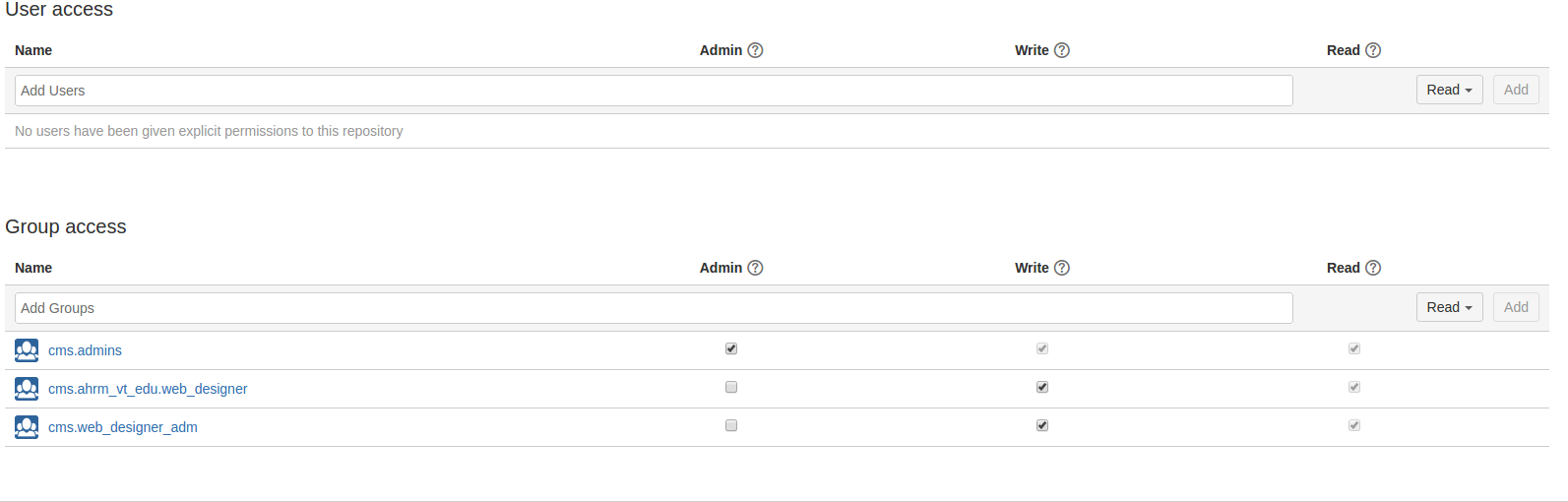
| Name | Admin | Write | Read |
|---|---|---|---|
cms.admins |
✓ | ✓ | ✓ |
cms.web_designer_admin |
✓ | ✓ | |
cms.<name_of_site>_web_designer |
✓ | ✓ |
Install the Hook
Under Settings -> Hooks, click the link for "External Async Post Receive Hook"
| Field | Value |
|---|---|
| Executable | push-cms-assets.sh |
| Safe Mode | ✓ |
| Positional Parameters | CMSASSETS |
Update Ticket / Notify the Requestor
Update the ticket with a note similar to:
Your local assets are now available at <link to the assets repo you just made>

We strongly suggest using an SSH key to access local assets in BitBucket.
See [How Do I ... Modify Provided Site Themes|https://ensemble.cms.vt.edu/help/how-to/edit-local-assets.html] for more information.
Sync All Local Assets on a Web Server / Application Server
Changes to assets are pushed out to the various web and application servers with the commit hook, but with a new server we need to start from scratch by iterating over all the assets repositories.
TODO: How do we get the full list of local_assets repos?
[14:10:57] cms@cmsw-prod-02:~$ cd /apps/cms/var/htdocs/AEM/local_assets/
[14:11:48] cms@cmsw-prod-02:local_assets$ for site in *; do echo ${site}; /apps/local/VT/scripts/assets/notify-receiver.sh CMSASSETS/${site}; done
Push updated assets to all machines
This is invoked on scm.db.vt.edu as the es-repo user. Replace the STASH_REPO_NAME below with the name of the local or global assets repository.